One portal for every client, project, and invoice.
YourWorkHQ Portal gives your team a single, branded home for projects, milestones, messaging, deliverables and invoicing — so clients stop emailing you for status updates and start finding answers themselves.
Bring your own tools
Connect Stripe, Resend and Cal.com — payments, email and booking run on infrastructure you control, not ours.
Fully isolated & secure
Postgres row-level security keeps every organization's data invisible to every other, enforced at the database.
Your brand, not ours
Custom domain and full white-label branding, so clients only ever see your team — never YourWorkHQ.
Running client work shouldn't feel like herding five different tools.
Most agencies stitch together email, spreadsheets, a project tool and an invoicing app — and clients still don't know what's going on.
"Just checking in" emails
Clients email you for status updates because they have no other way to see what's happening on their project.
Scattered spreadsheets and folders
Scope, invoices, deliverables and sign-offs live in five different tools that never quite agree with each other.
No single source of truth
When a client asks "where are we on X," the honest answer is a PM digging through Slack, email and a spreadsheet.
How it works
Three steps from signup to your first client logging in.
Set up your organization
Create your agency workspace, invite your team, and add your first client company in minutes.
Bring projects into one place
Add projects, milestones and tasks, connect your invoicing, and give each client their own branded login.
Let the portal do the updates
Clients see live progress, approve deliverables, and pay invoices — without another status-update email.
Everything client work needs, nothing it doesn't
Built specifically for teams managing multiple clients — not a generic project tool stretched to fit.
Projects, milestones & tasks
Give every project real structure — phases, milestones and tasks your clients can actually follow, instead of a flat to-do list only your team understands.
Milestones stay attached to the work
Tasks live inside the milestone and project they belong to, so nothing floats free in a separate tracker your client never sees.
Real progress, not a status update
Clients see the actual state of the work as it changes — no more digging through email threads to find out where things stand.
Health and due dates, visible without asking
At-risk milestones and approaching deadlines show up automatically, so a client never has to ask “are we on track?”
One view for every client
Each client's portal only shows their own projects — a focused view, not a shared board cluttered with everyone else's work.
Client invoicing built in
Stop chasing payments over email. Raise, send and collect on invoices from inside the same portal your clients already use for everything else.
Raise invoices against any project
Bill for a milestone, a retainer, or a one-off — invoices link straight back to the work they're for.
Clients pay from their own login
No separate payment portal or PDF to download — clients pay directly from the dashboard they're already in.
Funds settle to your own Stripe account
Payments run through your connected Stripe account, not ours — the money is yours the moment it clears.
Paid, sent, overdue, at a glance
Every invoice's status is visible without asking, so no client can say they “never got it.”
Built-in bookkeeping
Skip the separate accounting software. Log deposits and withdrawals against a project and watch your income statement and balance sheet update automatically, in the currency and tax codes that match where you're based.
A real chart of accounts
Deposits and withdrawals post against proper accounting categories, not a flat spreadsheet row.
Income statements, generated automatically
See what came in and went out per project or per period without building a report by hand.
Balance sheets that stay current
Your financial position updates as transactions are logged — no end-of-month reconciliation scramble.
Matched to where you operate
Currency and tax codes follow your organization's own settings, not a one-size-fits-all default.
Project messaging
Keep every conversation exactly where the work happens, instead of scattered across email chains, Slack DMs and meeting notes nobody can find again.
Every conversation lives with its project
Open a project and the full message history is right there — no searching your inbox for a thread from three weeks ago.
Nothing buried in email or Slack
Client-facing conversations happen in the portal, not in a private DM only one person on your team can see.
One thread, both sides
Your team and the client read and reply in the same place — no separate internal and external copies to keep in sync.
A record that holds up
Every message is timestamped and kept with the project, so there's a real answer if a client asks “when did we agree to that?”
Client meeting booking
Connect your existing calendar and let clients book time with you directly from the portal — no more five-email thread just to land on a time that works.
Booked straight from the portal
Clients see your real availability and pick a slot without leaving the same dashboard they use for everything else.
Runs on your own Cal.com account
Meeting scheduling connects to infrastructure you already control, not a new calendar tool to learn.
No more back-and-forth scheduling
One link, real availability, booked in one step — scheduling stops being its own small project.
Meetings tied to the right project
Bookings live alongside the project they're about, so context isn't lost between the call and the work.
Deliverables & sign-off
Turn deliverable approval into an actual recorded decision, not a vague “looks good” reply buried in an email thread.
Clients formally review each deliverable
Every file or milestone submitted for approval gets a clear review step, not an assumption that silence means yes.
Sign-off is logged, not implied
Approvals and requested changes are timestamped and kept with the deliverable — a real record, not a memory of a call.
No more “I thought that was included”
What was approved is explicit, cutting off the most common source of scope disputes before they start.
Every review stays with the file
Feedback and approval history stay attached to the deliverable itself, not scattered across separate email replies.
Centralized file storage
Every document, purchase order and deliverable file lives with the project it belongs to — not scattered across email attachments and someone's local Downloads folder.
Files live with their project
Open a project and every related document is right there, not buried in a search across three different tools.
Purchase orders and deliverables together
Contracts, POs and deliverable files sit in the same place, so nothing gets separated from the work it documents.
Nothing scattered in email
Attachments stop disappearing into individual inboxes — the file that matters is where the project is.
Access scoped to the right people
Clients see the files relevant to their own projects, not a shared drive with everyone else's documents mixed in.
Scope tracking & change requests
Scope creep is the quiet killer of agency margins. Give clients a real way to request changes — and give your team a paper trail for every one of them.
Scope stays visible, separate from the plan
What was originally agreed stays distinct from what's since been added, so scope creep is visible, not just felt.
Accept, negotiate, or decline — on the record
Change requests get a real decision, not a reluctant yes buried in a reply-all email.
Every negotiation kept with the request
The back-and-forth on a change lives with that specific request, not scattered across separate threads.
Every decision is dated
Accepted, declined or renegotiated — each change request keeps a timestamped record of what was decided and when.
Compliance tracking
For teams that need to prove it, not just say it: an immutable record of every data lifecycle action, from archives to restores to deletions.
Every data lifecycle action is logged
Archiving, restoring or deleting a record leaves a permanent entry, not a silent change nobody can trace.
Built for teams that get audited
When a client or regulator asks how data was handled, the answer is a real record, not a best guess.
Immutable by design
Compliance entries can't be quietly edited after the fact — the record is the record.
Tied to the org that owns the data
Each organization's compliance trail is scoped to their own data, isolated from every other org on the platform.
Audit trail & data ownership
Every important action across the portal is logged, and a full export of your data is always available — including if you ever decide to leave.
Every important action is logged
Who did what, and when, is recorded — not left to memory or a message nobody can find later.
A full export, any time
Your organization's data is never held hostage — export everything whenever you need to.
Ownership stays with you
The data your team and clients create belongs to your organization, not locked into a platform you can't leave cleanly.
Nothing missing if you go
Even on the way out, your data export is complete — projects, messages, invoices, and the record of everything in between.
Reminders & reports
Automated reminders and one-click PDF progress reports keep clients informed without a PM lifting a finger for every single update.
Reminders send themselves
Upcoming due dates and pending approvals get followed up on automatically, not chased manually one by one.
Progress reports in one click
Generate a client-ready PDF summary of where a project stands, instead of assembling one from scratch every time.
Keeps clients informed by default
Status updates go out on their own cadence, so “just checking in” emails stop being necessary.
One less thing for your PMs
Routine follow-ups happen without someone remembering to send them — time back for the work that actually needs a person.
In-portal notifications
Deliverable status, scope changes and invoice activity land inside the portal itself — not just as one more email easy to miss in a crowded inbox.
Activity surfaces where the work is
Status changes show up next to the project they belong to, not as a disconnected email notification.
Both sides stay informed
Your team and your clients see the same updates, so nobody is working from stale information.
Nothing depends on checking email
A client who never opens the notification email still sees what changed the next time they log in.
A running record, not just a ping
Notifications persist in the portal, so catching up after a few days away doesn't mean reconstructing what happened from memory.
Bring your own tools
Connect your own Resend, Stripe and Cal.com accounts, so the infrastructure behind email, payments and scheduling is one you already control — not ours.
Email runs on your Resend account
Client-facing notifications send from infrastructure you own, not a shared platform inbox.
Payments run on your Stripe account
Client invoices settle directly to you — funds never pass through us as a middleman.
Scheduling runs on your Cal.com account
Meeting booking uses the calendar tool you're already set up on, not a new one to configure.
You keep the keys
If you ever move on, your email, payment and scheduling infrastructure moves with you — none of it lives inside our platform.
Your own custom domain
Move off the shared subdomain and onto your own domain, so the portal your clients log into only ever looks like you — never like a piece of software you're renting.
Your domain, not ours
Clients type in your address, not a generic subdomain that gives away you're using a third-party tool.
Consistent with the rest of your brand
The portal sits alongside your website and email under the same domain your clients already trust.
Available on Pro and Scale
Custom domains and full white-labelling come standard once you're running client work at real scale.
Set up once, applies everywhere
Once configured, every client's portal link uses your domain automatically — no per-client setup.
Your own branded portal
Every client logs into a workspace scoped entirely to your organization — their data, your brand, fully isolated from every other agency on the platform.
Scoped to your organization
Each client's portal only ever shows your work, your branding, and their own data — nothing bleeds across organizations.
Your brand, not a generic template
Logo, colors and domain are yours, so the experience reads as your own product, not a rented tool.
Isolated at the database level
Row-level security enforces the separation, not just an interface convention that could leak.
The portal you'd want clients to see
Polished enough that using it becomes part of how professional your agency looks, not something to apologize for.
Key features
Everything in one branded space
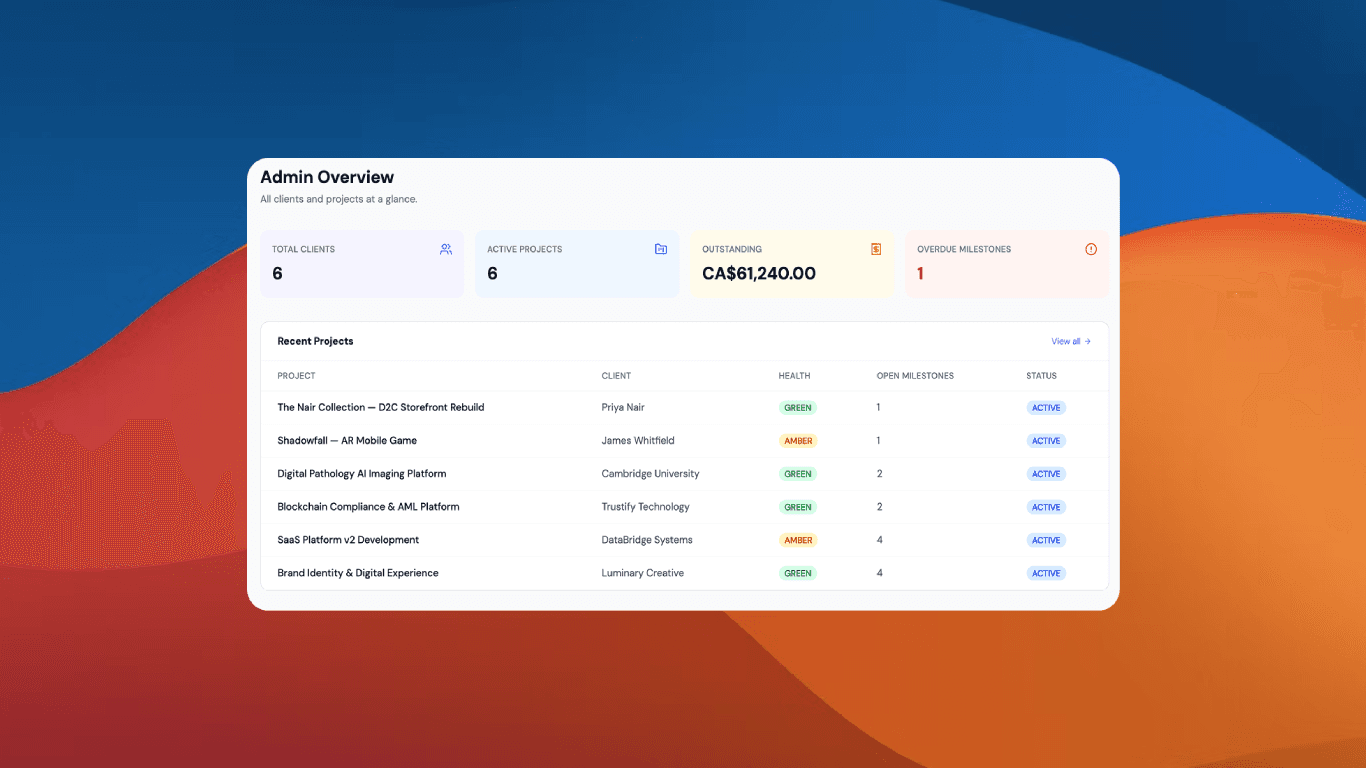
Everything at a glance
Clients, projects, invoices and overdue milestones in one dashboard.
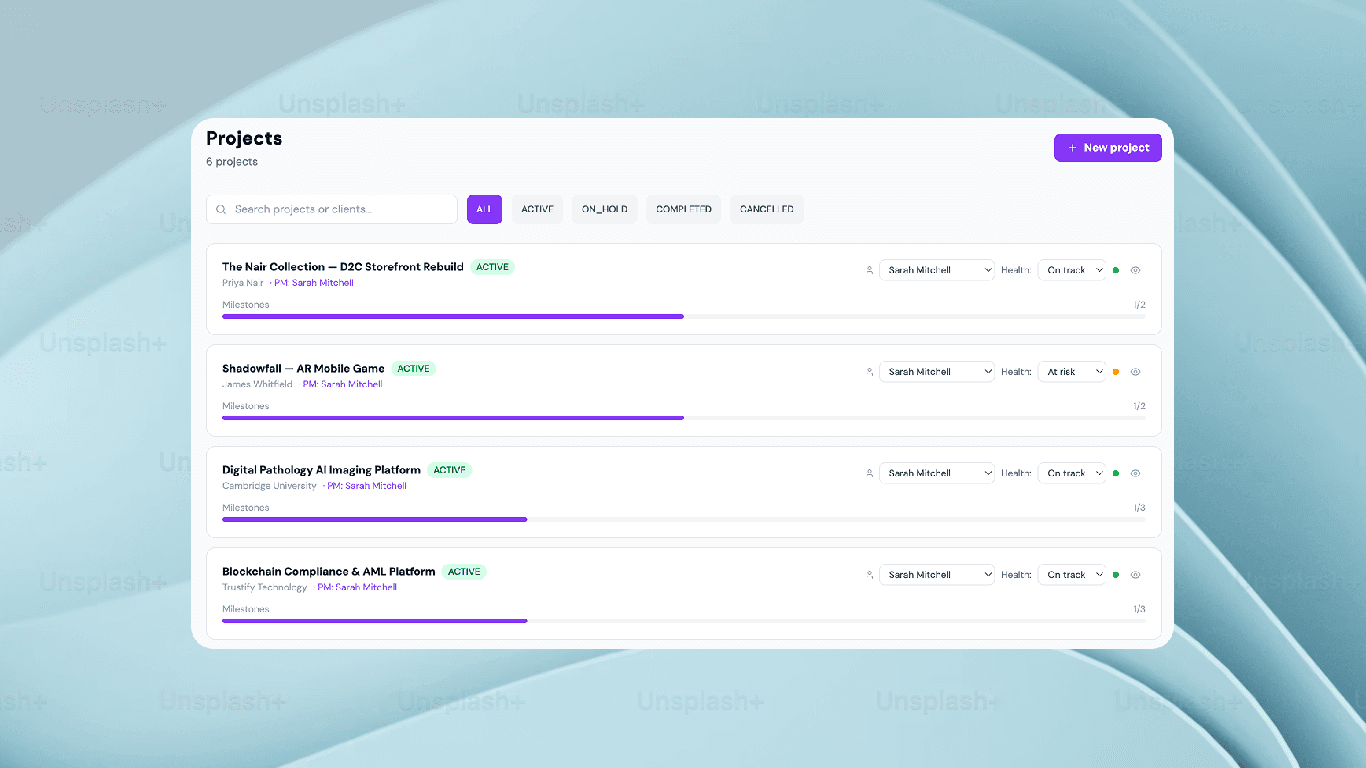
Plan the work
Break projects into milestones your clients can actually follow.
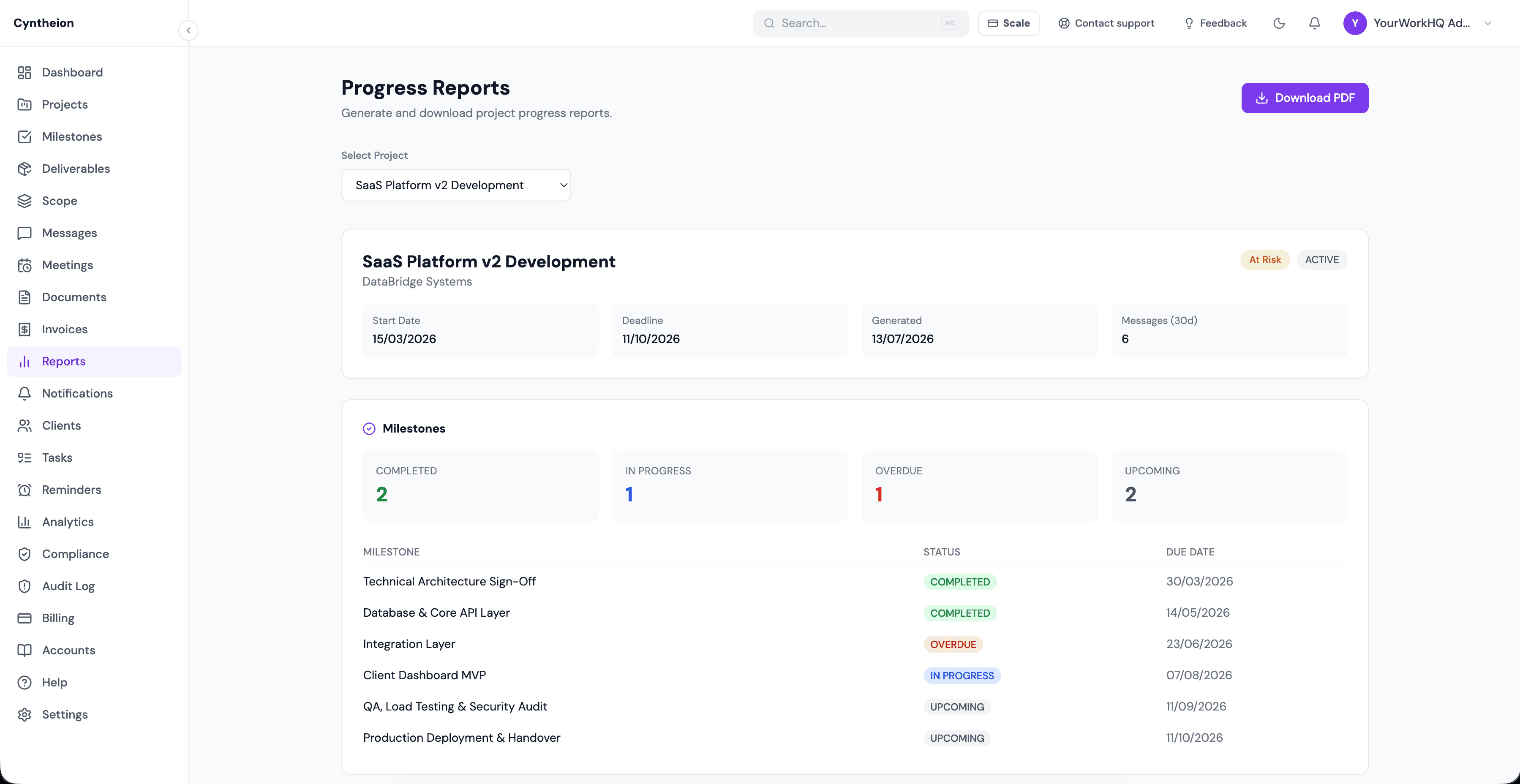
Get paid faster
Raise and track invoices without leaving the portal.
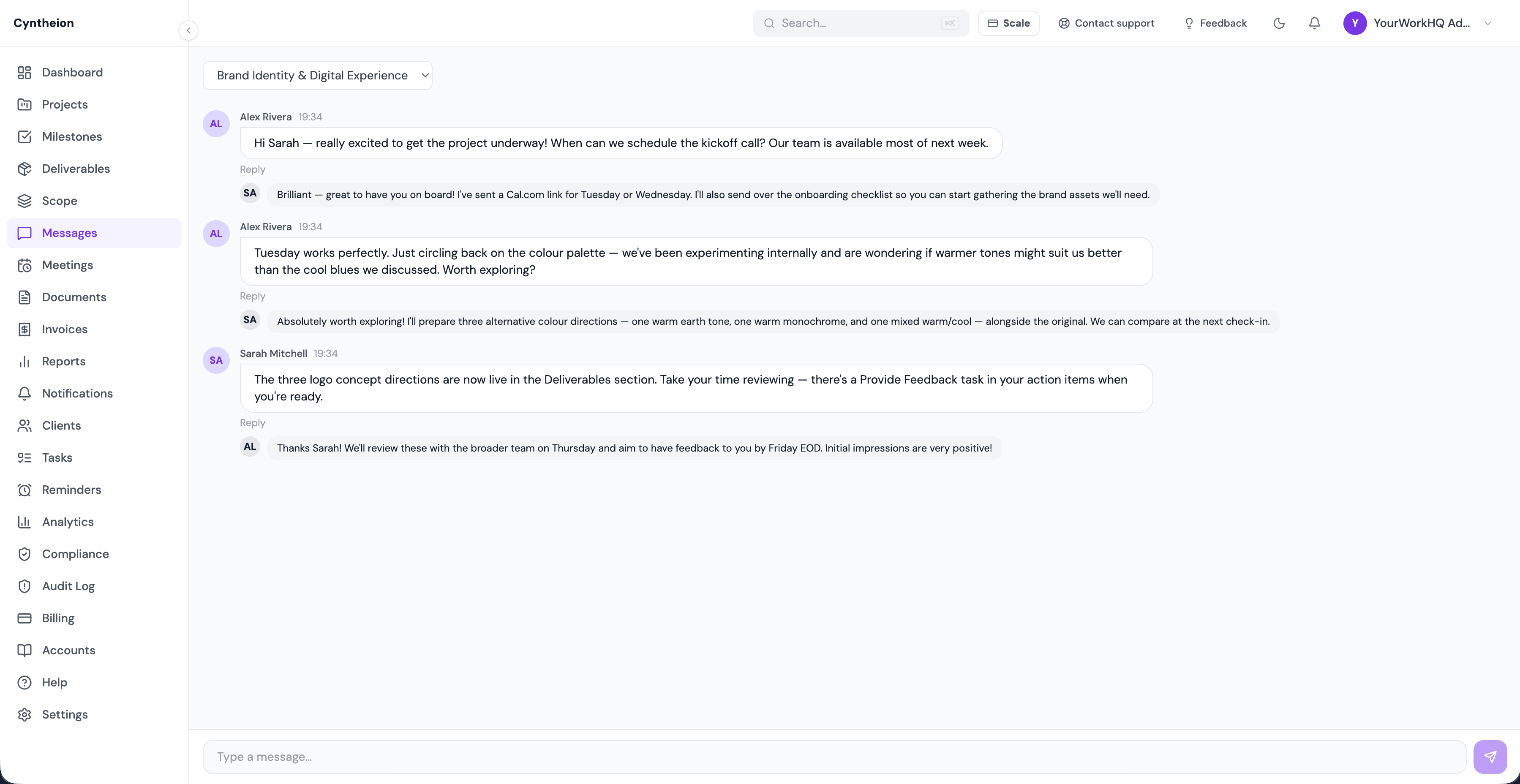
One thread per project
Every conversation lives with the work it's about.
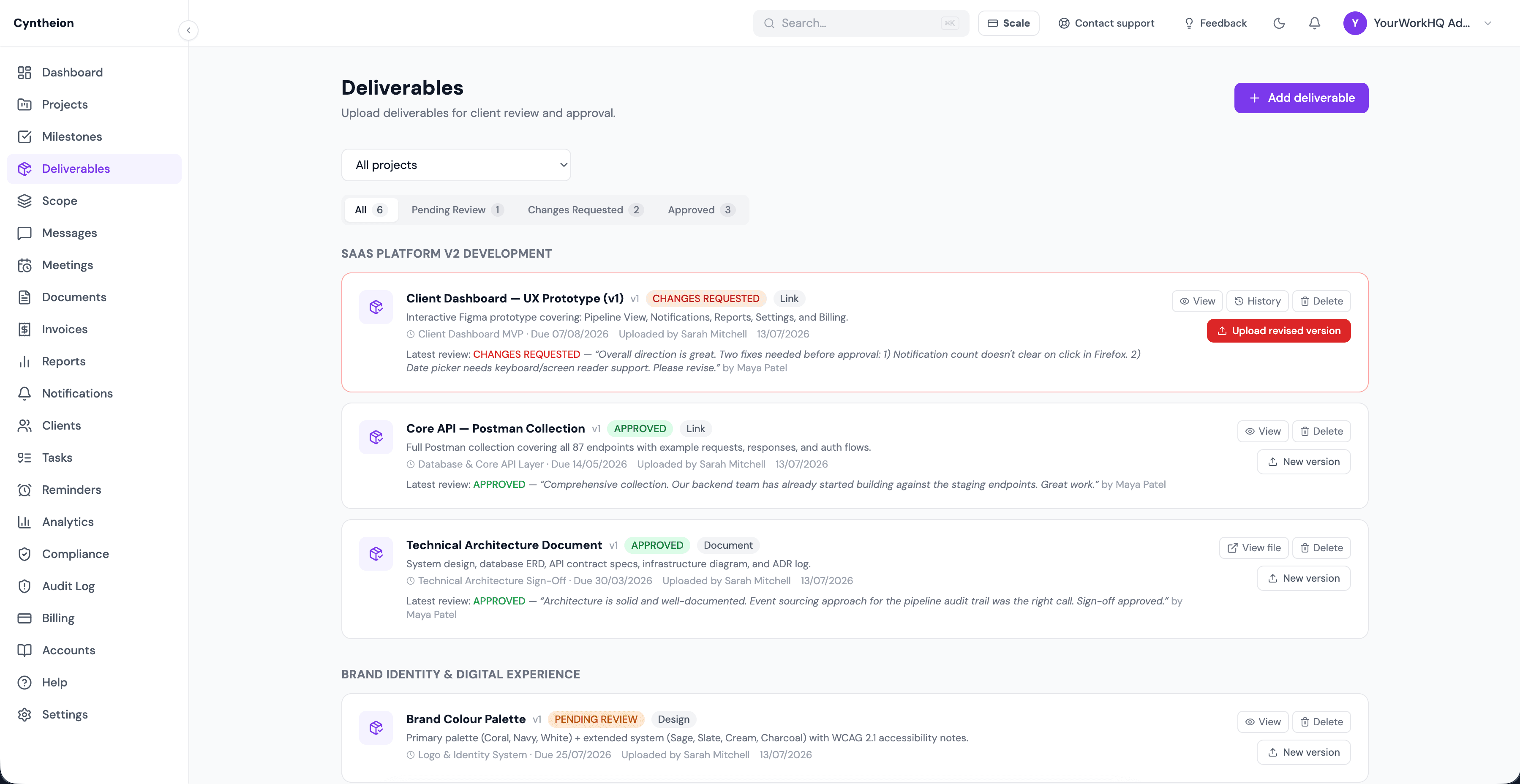
Sign-off with a paper trail
Approvals are logged, not just implied.
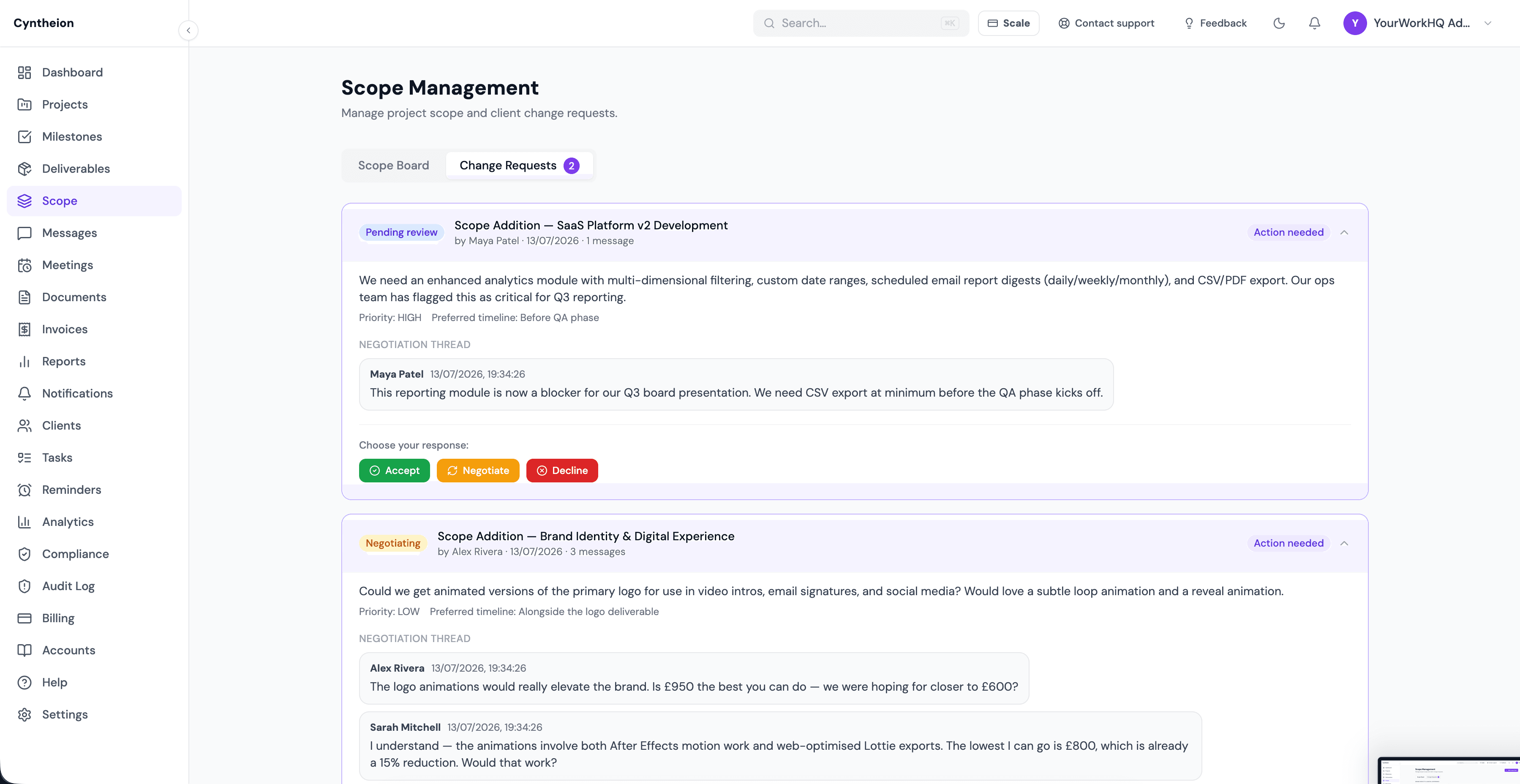
Negotiate scope, not email chains
Change requests get accepted, negotiated, or declined right where they're raised.
Why we built this
“We built this to run our own agency first — then opened it up.”
YourWorkHQ started as the internal portal we used to manage our own clients' projects, invoices and messaging — because email and spreadsheets weren't cutting it for us either. We're now opening it up to a small group of teams — agencies and enterprise client-services orgs alike — as early access, running the same setup we use ourselves.
— The YourWorkHQ team
Simple pricing that scales with your team
Every plan includes the full portal — projects, invoicing, messaging and deliverables. Higher tiers raise your seat, client and storage limits.
Free trial
Try the full portal for 14 days
- 3 staff seats
- 3 client companies
- 1 GB storage
- 30-day audit log
Starter
For agencies onboarding their first few clients
- 5 staff seats
- 25 client companies
- 25 GB storage
- 90-day audit log
Pro
For growing agencies running client work at scale
- 15 staff seats
- 100 client companies
- 100 GB storage
- Custom domain & white-label
- 1-year audit log
Scale
For large agencies and enterprise teams with custom needs
- Unlimited staff seats
- Unlimited client companies
- Custom storage
- Custom domain & white-label
- Custom audit retention
Give your clients one place to look, instead of five.
Start your free 14-day trial — no credit card required, live in under 10 minutes.
FAQ